Bathroom blind
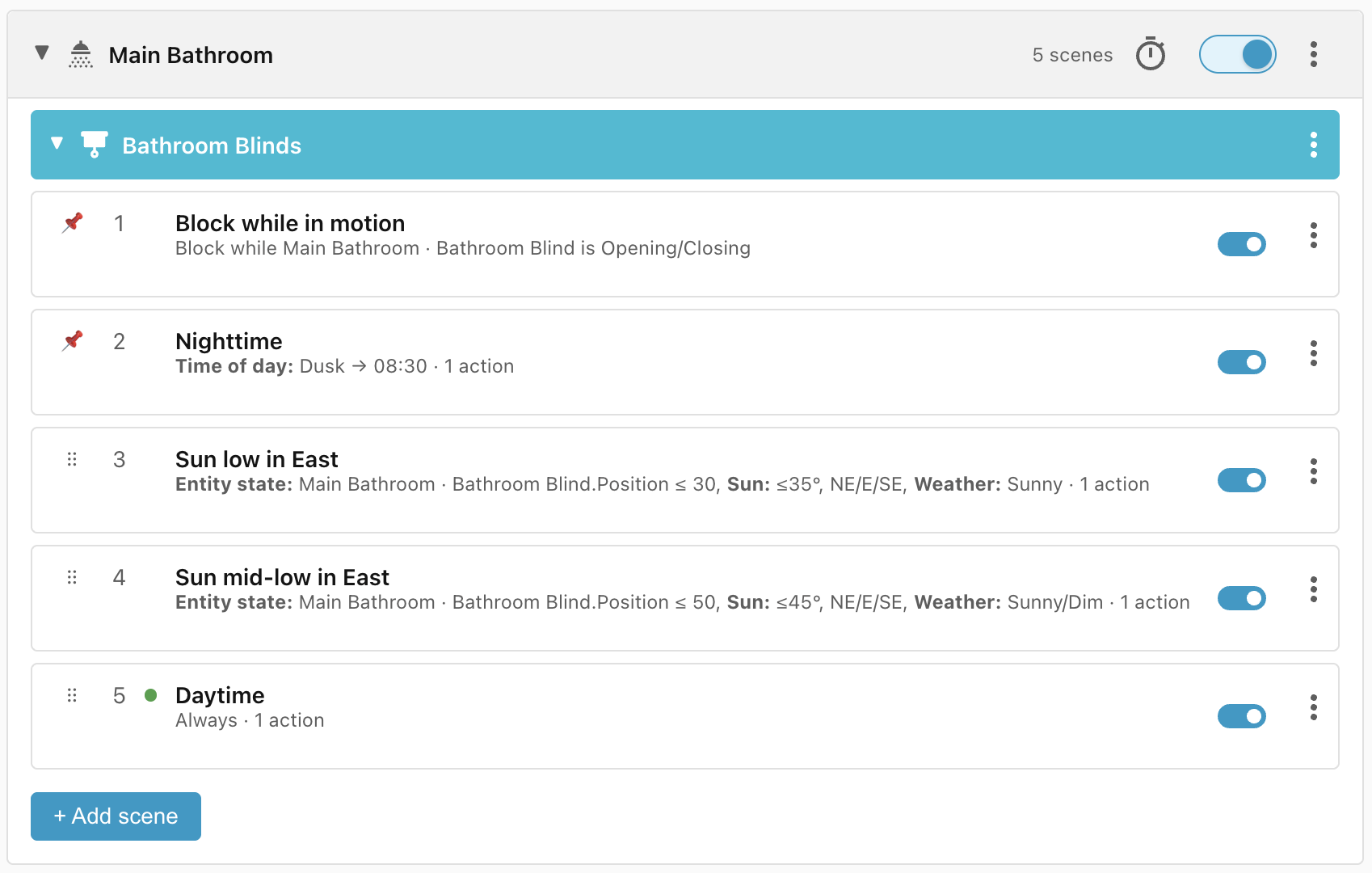
This recipe describes the lifecycle of the window blind in the bathroom. I want the blind to be open between 8:30 am and dusk and closed between dusk and 8:30 am.
On top of that, the blind faces east so in the early morning the light can be blinding, so I want the blind to open gradually, especially when it is sunny. However, if I decide to open the blind manually before time, then I don't want Ambience to close the blind automatically again.
Requirements
- Bathroom blind - Cover entity to control the blind and which exposes the current position of the blind.
Scene: Nighttime
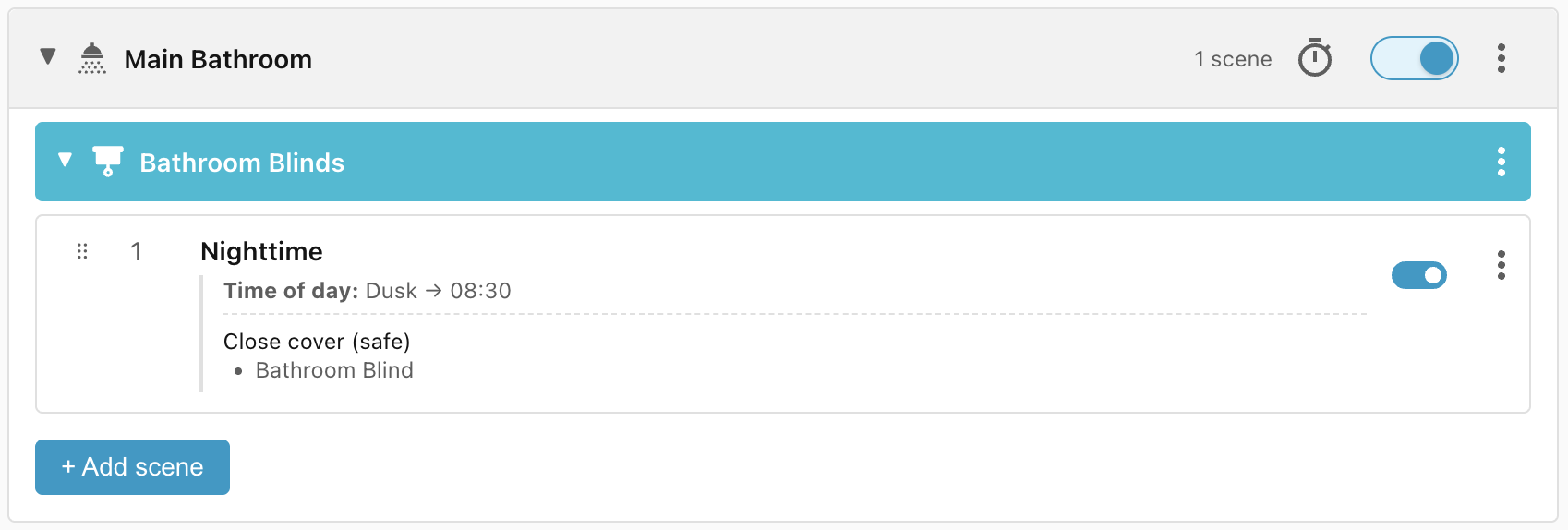
The clearest condition is the Nighttime scene where the blind should be closed between dusk and 8:30 am:
Close cover (safe)
We have used the built-in Close cover (safe) action, which first checks the position of the cover and only closes the blind if it is not already closed, to avoid activating the blind motor.
Scene: Daytime
The second scene specifies that the blind should be open between 8:30 am and dusk.
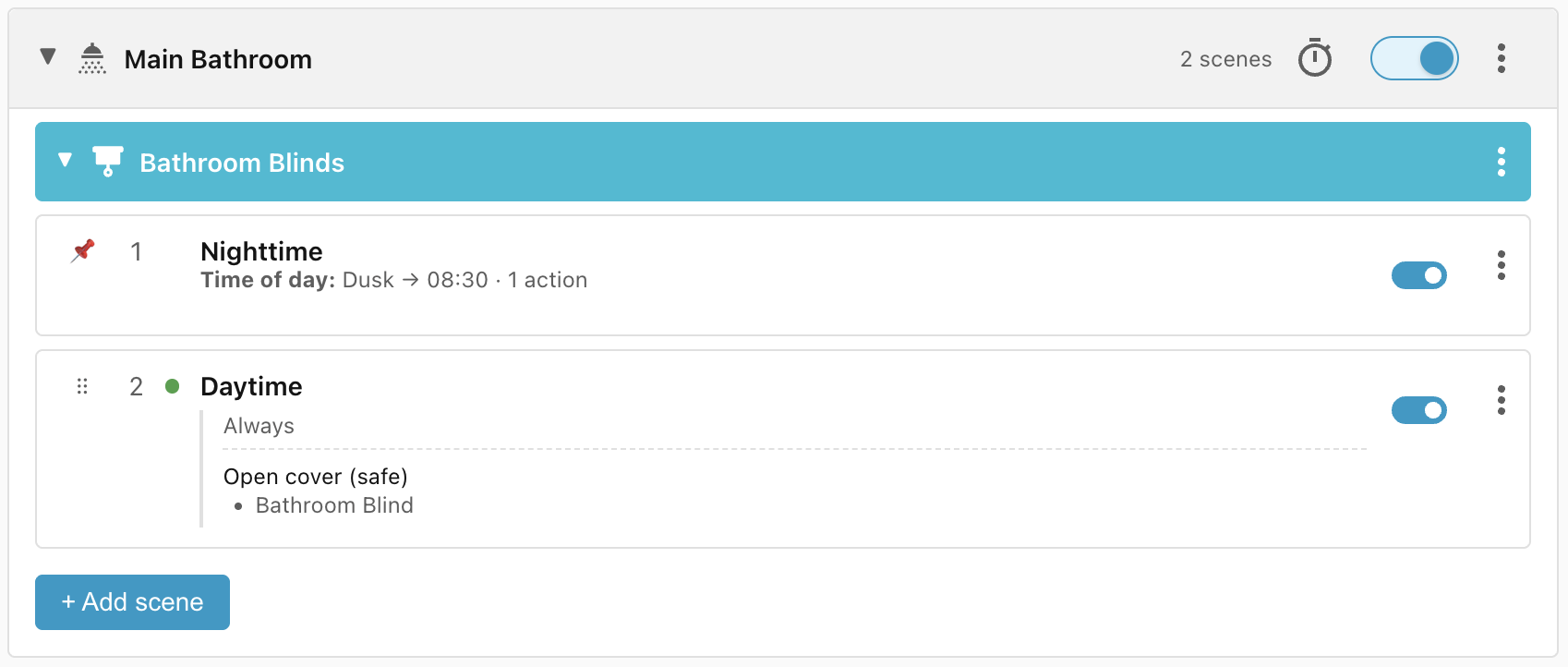
Note that the Daytime scene doesn't specify a time-of-day. That's because we know that if the Nighttime scene (which only matches between dusk and 8:30 am) doesn't match, then any scenes after that are guaranteed to be in the daytime range.
Scenes: Sun low in East, Sun mid-low in East
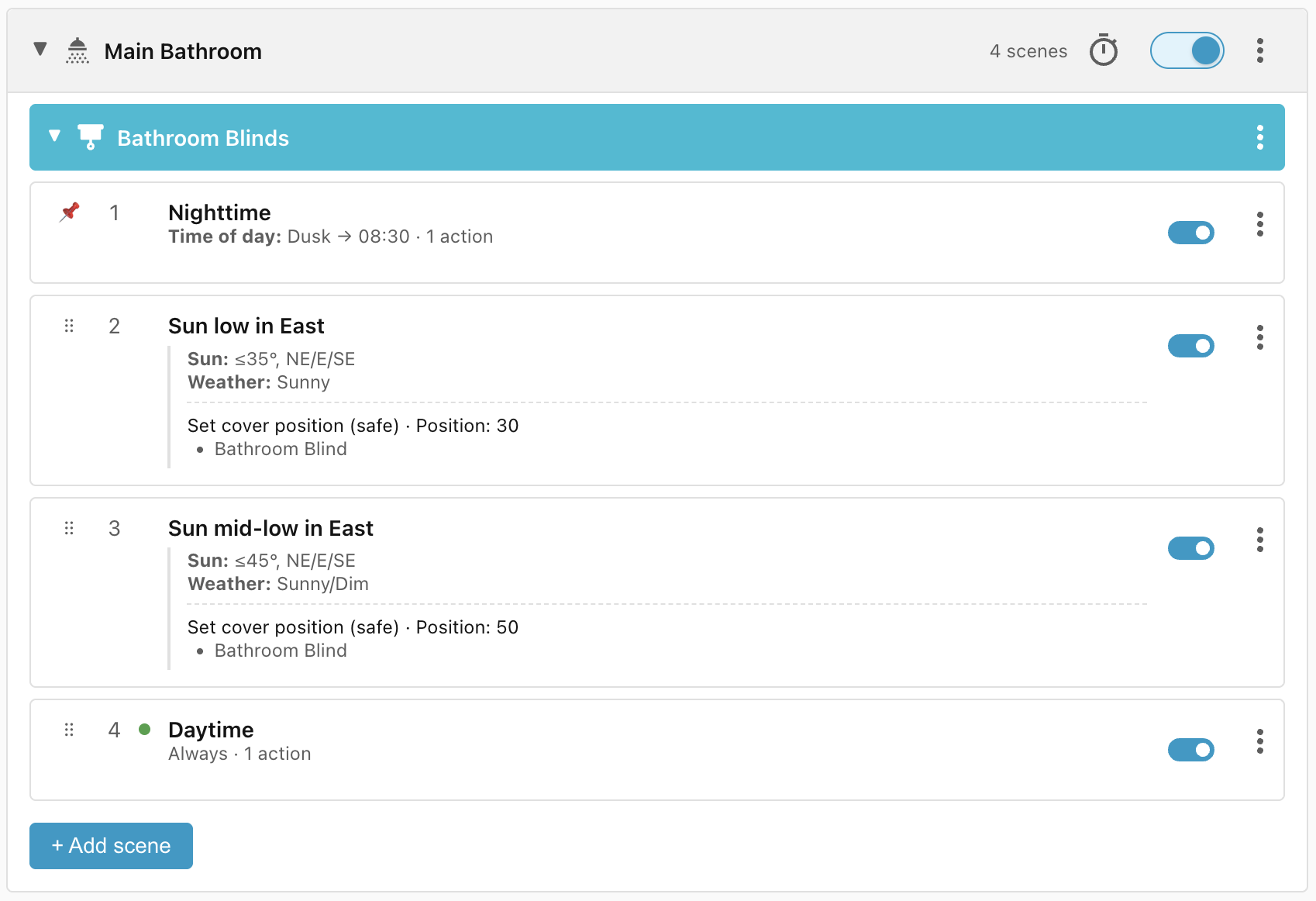
Next, I want the blind to open gradually to prevent the sun from shining into the bathroom too brightly. To accomplish this I add two scenes:
Sun low in East:
- the sun is in the NE, E, or SE quadrant,
- the sun is no more than 35º above the horizon,
- and the weather is sunny.
→ Opens the blind to 30%.
Sun mid-low in East:
- the sun is in the NE, E, or SE quadrant,
- the sun is no more than 45º above the horizon,
- and the weather is sunny or dim.
→ Opens the blind to 50%.
The first scene only matches if the weather is sunny. The second matches if the weather is sunny or dim, and if the weather is dark then neither matches.
Problem: Don't override manual opening
If somebody opens the blind manually then we don't want either scene to match, otherwise Ambience would immediately close the blind to 30% or 50% again. To accomplish this we add an entity state condition to check that the blind position is lower than the position we're about to open to (i.e. 30% or 50%).
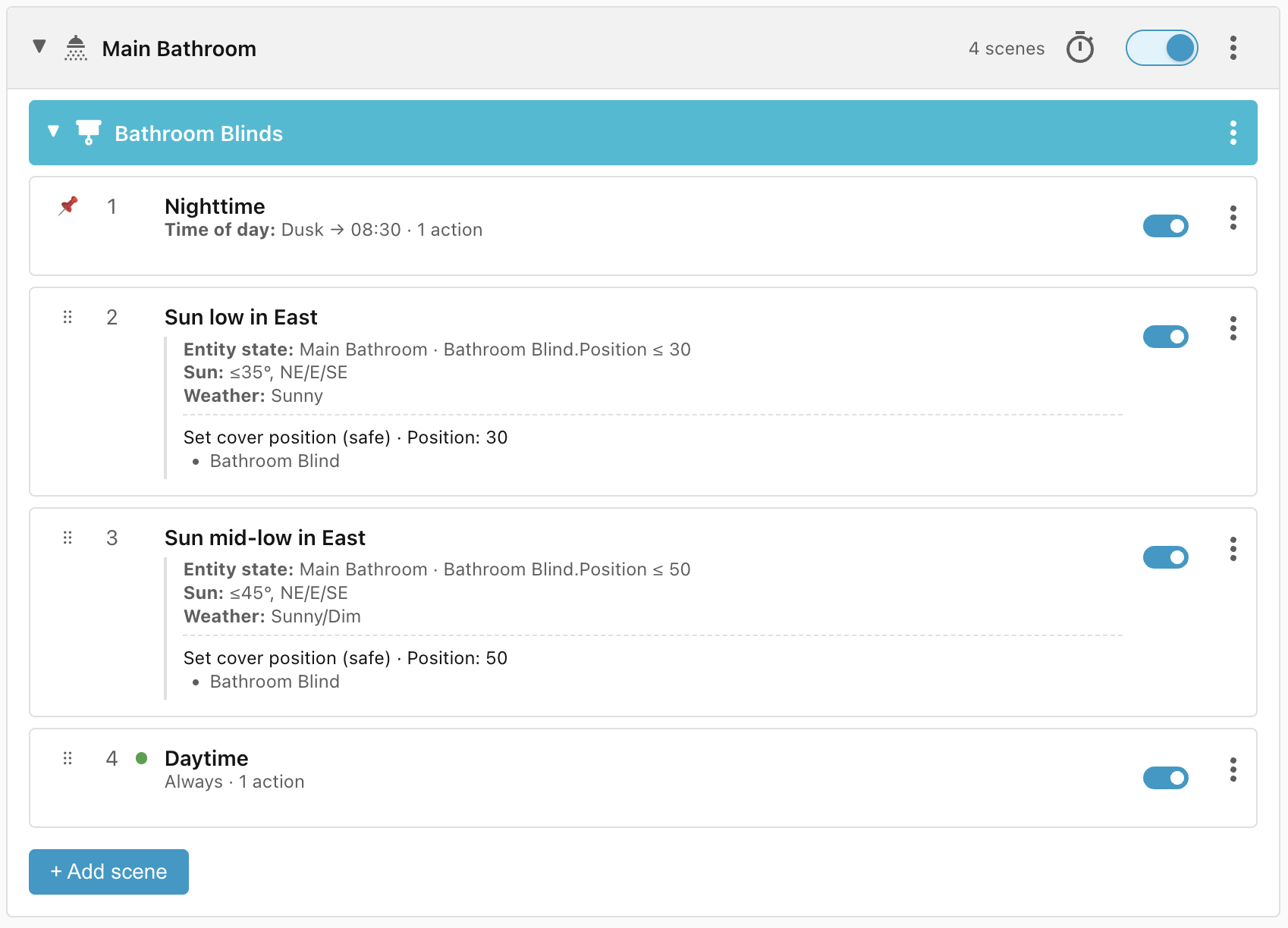
Because these two scenes use the entity state condition (which has a high priority), they would normally be sorted above the Nighttime scene, but we need the Nighttime scene time-of-day condition to act as a gate for the daytime scenes, so we manually move it to the highest priority.
Problem: Opening the blind triggers reevaluation
Because we check the blind position in Sun low/mid-low in East, if we were to open the blind manually then it would trigger reevaluation of the scenes and potentially stop opening at 30% or 50%. To avoid this we can add a scene that blocks evaluation while the blind is opening or closing:
Lifecycle
| Trigger | Matched Scene | Action |
|---|---|---|
| Dusk falls | Nighttime | Blind closes |
| At 8:30 am, blind is closed, sun is in the East at 25º above the horizon, and the weather is sunny | Sun low in East | Blind opens to 30% |
| At 8:30 am, blind is closed, sun is in the East at 25º above the horizon, and the weather is dim | Sun mid-low in East | Blind opens to 50% |
| At 8:30 am, blind is closed, sun is in the East at 25º above the horizon, and the weather is dark | Daytime | Blind opens to 100% |
| At 8:30 am, blind is fully open, sun is in the East at 30º above the horizon, and the weather is sunny | Daytime | Blind remains open |
| At 9:05 am, blind is open to 30%, sun is in the East at 36º above the horizon, and the weather is sunny | Sun mid-low in East | Blind opens to 50% |
| At 9:45 am, blind is open to 50%, sun is in the East at 46º above the horizon | Daytime | Blind opens to 100% |