Placement
Good placement gives you a room that calibrates cleanly and leaves the zones you care about inside the LD2450's tracking circle. The two radars' fields of view and effective ranges decide what's possible.
Corner mount (recommended)
Mount the device in a room corner, pointing towards the opposite corner (or towards the areas of most interest).
Why a corner works: the LD2450's 120° horizontal FOV is wider than a room corner's 90° internal angle, so the FOV cone fits neatly into a corner. From a corner, one sensor can cover a rectangular room's entire interior without dead spots.
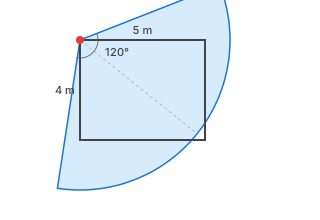
Practical guidance:
- Pick the corner opposite the door, or the corner that gives the clearest view of the zones you care about most.
- Mount pointing towards the opposite corner, or in the direction which will give you the best coverage of areas of interest.
- Avoid corners blocked by furniture or walls on either side of the device. The FOV needs to project into open space.
Tip
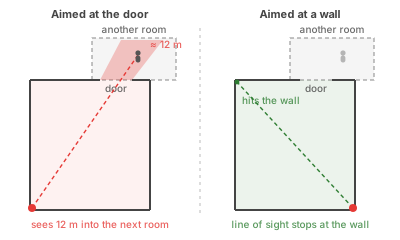
The motion sensor's range can't be tuned. If the device points directly at the door, its line of sight runs straight through the open doorway, and it can pick up movement up to 12 m away in the next room — marking the room occupied when no one is in it. Where this matters, angle the device so its line of sight faces a wall rather than an open doorway. Also see the mmWave Presence entity for an alternative when optimal placement isn't possible.
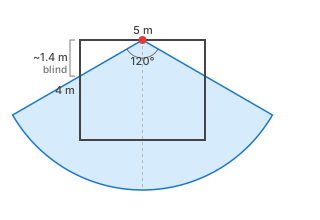
Why a mid-wall mount is harder: with 120° FOV, the device sees ±60° of the wall it's mounted on. A mid-wall mount typically leaves triangular dead zones at each end of the mounting wall, unless the room is narrower than the FOV can cover.
Mounting height (1.3–2.0 m)
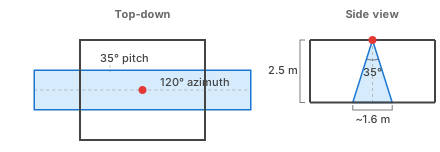
Mount the device between 1.3 m and 2.0 m above the floor — above the head of someone seated, below standard ceiling height. The LD2450's 70° vertical field of view is generous enough that with horizontal aim, the cone covers head-to-toe across most of the room.
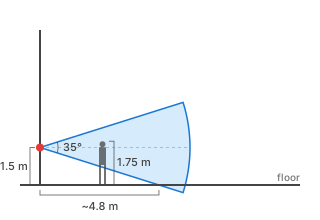
Close to the device — within about 2 m horizontally — the cone hasn't yet reached the floor, so the lower body of someone standing right next to the sensor falls below the cone's lower edge. Pick a corner that puts the zones you care about at least a couple of metres out from the device, not right beneath it.
You don't normally need to tilt the device. The cone is wide enough vertically that horizontal aim covers the useful body-height range across the whole tracking circle.
Ceiling mount (not supported)
The Everything Presence Pro ships with a ceiling mount, but ceiling mounting is not recommended and is not supported by this integration. The HLK-LD2450 datasheet itself specifies wall mounting, because the radar's geometry doesn't translate to a ceiling install.
Coverage isn't the issue. The LD2450's 70° vertical cone lights up a roughly 3.5 m circle on the floor from a 2.5 m ceiling, which would be fine for a small room. The problem is that ceiling mount loses a dimension.
The LD2450 reports each target as two coordinates: a lateral position (left–right across the radar's view) and a forward distance from the sensor. The zone engine uses both to figure out which floor zone someone is in.
Wall-mounted, that maps cleanly to the room: lateral = left–right across the room, forward distance = depth from the wall. You get a real 2D (X,Y) floor position.
When ceiling-mounted with the radar pointing down, the lateral position still tracks left–right along one floor axis, but forward distance is now essentially the gap between the ceiling and the top of the person — dominated by their height, not by where they're standing.
You can still tell left from right (X), but you can't tell which end of the room someone is in (Y), and movement along the perpendicular floor axis is invisible to the radar entirely. Zones laid out across the floor can't be distinguished. Calibration can't fix this issue: the missing axis is a hardware limit, not a calibration offset.
Warning
Ceiling mounting is not currently supported. If you've mounted a device on the ceiling in a previous installation, move it to a wall corner before running calibration.
If you have a good use case for ceiling mounting, open an issue with your rationale and we can discuss it.
Tracking range vs static-presence range
The two radars have different effective ranges, which affects where you can place zones.
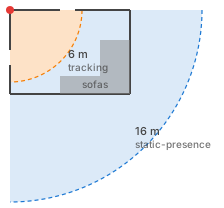
- LD2450 tracking circle — 6 m. Inside this circle the sensor reports 2D target coordinates, which the zone engine uses for per-zone presence and target-count entities. Outside this circle the LD2450 can still see radar returns but can't localise them into coordinates.
- SEN0609 presence circle — 16 m. Inside this much larger circle the SEN0609 reports a single "someone is here" signal, with no coordinates.
Practical consequence:
- Zones of interest must fit inside the 6 m tracking circle. A zone at 7 m from the sensor won't get per-target counts or movement-based zone-entry events. It will still contribute to room-level occupancy through the SEN0609 and the combined Occupancy sensor, just not through zone-specific entities.
- For larger rooms, this is usually the main constraint on where to mount the sensor. Pick a corner that puts your important zones inside the 6 m circle.
In the image below the sensor is monitoring the two entrances with the LD2450 tracking sensor, but its range doesn't reach the sofa. The static sensor still tells us there is somebody in the room, which may be enough for your needs.
Obstructions and interference
The sensor needs a clear line of sight to the room corners. Anything blocking a corner will either force you to enter offsets manually during calibration or throw the calibration off entirely. Move large furniture out of the corners before calibrating if you can; if you can't, use the wizard's offset fields to compensate.
Known noise sources (ceiling fans, billowing curtains, large reflective surfaces) inside the FOV will produce radar returns. The radar sees the motion even though there's no person involved. Adjusting the mount won't help — handle these after calibration with Interference or Suppress overlays. See Overlays for which tool fits which situation.
Worked example: a 4 × 5 m living room
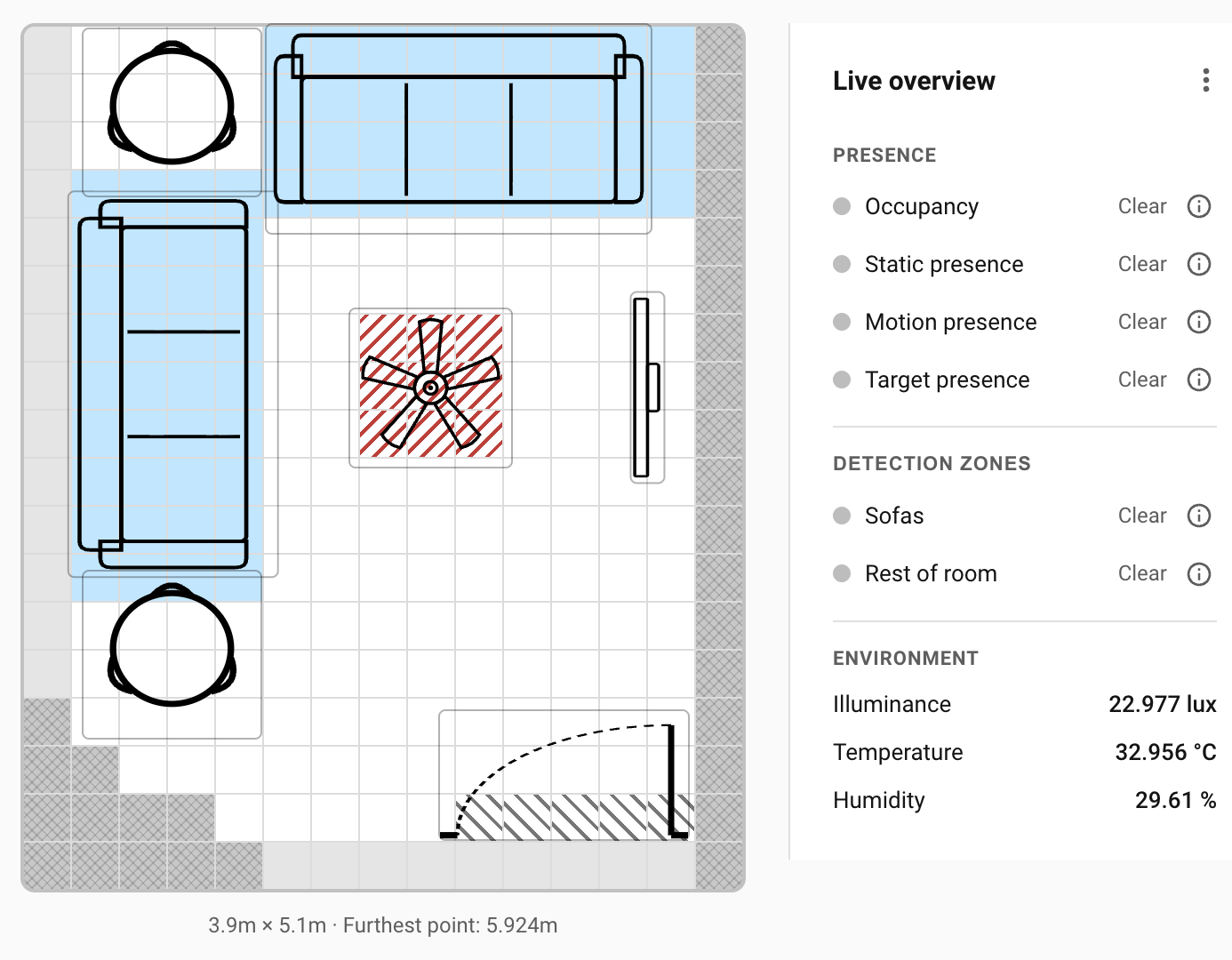
- Room: 4 m × 5 m with one door, a ceiling fan in the centre, and a sofa against the long wall opposite the door.
- Mount location: the corner diagonally opposite the door, above the side table.
- Orientation: angled towards the opposite corner, so the 120° FOV covers the whole floor.
- Mount height: 1.3 m, aimed horizontally.
- Zone of interest:
- "Sofas" — ~1 m from the sensor, comfortably inside the 6 m tracking circle.
- Follow-ups after calibration:
- Entry/Exit overlay painted across the doorway cells.
- Interference overlay on the ceiling-fan cell.
That setup covers the whole room with tracking, keeps the sensor out of sight-lines and foot traffic, and lets the SEN0609 hold occupancy when people settle still on the sofas.
Where to next
- Calibration → — run the four-corner wizard so the grid matches the real geometry of your room.