Hardware
The Everything Presence Pro packs several sensors into one small unit: two mmWave radars, a PIR (passive infrared) motion sensor, environmental sensors for illuminance, temperature, humidity, an optional CO₂ sensor, and a network interface. Each of the Pro's presence sensors has its own blind spots, which is why Everything Presence Grid combines all three into a single Occupancy signal. The Everything Presence Lite carries a subset of this hardware — see Models below.
Models
Everything Presence Grid runs on two hardware models. Both share the same firmware core and the same zone engine, so the spatial features — zones, the grid, target tracking, room calibration, and heatmaps — work identically on each. The Everything Presence Lite is a lower-cost subset of the Everything Presence Pro: it keeps all the spatial features, plus CO₂ and light level, and drops the static-presence radar, motion sensor, temperature/humidity, relay, addressable RGB LED, Bluetooth, and Ethernet.
| Feature | Everything Presence Pro | Everything Presence Lite |
|---|---|---|
| Target tracking radar (LD2450) | ✓ | ✓ |
| Zones, grid & room calibration | ✓ | ✓ |
| Heatmaps | ✓ | ✓ |
| Stuck-target clearing & pipeline tuning | ✓ | ✓ |
| CO₂ sensor (SCD4x) | ✓ | ✓ |
| Illuminance / light level (BH1750) | ✓ | ✓ |
| OTA updates & diagnostics | ✓ | ✓ |
| Occupancy (fused room presence) | ✓ | ✓ |
| Bluetooth LE proxy | ✓ | — |
| Static-presence radar (SEN0609) | ✓ | — |
| Motion sensor (PIR) | ✓ | — |
| Target Presence & mmWave Presence | ✓ | — |
| Sensor-assisted clear | ✓ | — |
| Temperature & humidity (SHTC3) | ✓ | — |
| Relay output | ✓ | — |
| Addressable RGB LED (modes & effects) | ✓ | Status LED only |
| Network | Wi-Fi or Ethernet (PoE) | Wi-Fi only |
On the Lite, occupancy comes from LD2450 target tracking alone — there's no separate static-presence signal. The rest of this page describes the full Pro hardware; each section notes where the Lite differs.
Motion — fast infrared motion sensor
The PIR (passive infrared) motion sensor (Panasonic EKMC1603111) is the fastest of the three sensors. It detects body heat in motion and responds in a fraction of a second.
- Field of view: 102° horizontal × 92° vertical.
- Detection range: up to 12 m.
- Strength: quickest to react, and the widest field of view of the three.
- Weakness: only triggers on movement, and stops reporting within seconds once someone is still.
Not on the Everything Presence Lite. The Lite has no PIR; it detects people through the LD2450 alone. See Models.
The mmWave radars
Two mmWave radars cover different jobs.
LD2450 — movement tracker
The LD2450 is the workhorse. It reports 2D coordinates for up to three moving targets, which Everything Presence Grid uses to drive zone detection and target-count entities.
- Field of view: 120° horizontal × 70° vertical.
- Tracking depth: up to 6 m.
- Concurrent targets: up to 3.
- Strength: reports each person's 2D position in the room.
- Weakness: loses people who are genuinely still (reading, sleeping) after a few seconds, because tracking relies on frame-to-frame radar changes.
SEN0609 — static-presence radar
The SEN0609 is a DFRobot static-presence mmWave module that fills in where the LD2450 drops off. It only reports whether the room is occupied — "here" or "not here" — with no coordinates.
- Field of view: 100° horizontal × 40° vertical.
- Range: up to 16 m.
- Strength: picks up still occupants the LD2450 loses (reading, sleeping, showering), and reaches much further than the LD2450's tracking circle.
- Weakness: no per-target information, just a single room-wide presence signal.
Not on the Everything Presence Lite. The Lite has no static-presence radar, so occupancy there comes from LD2450 target tracking alone. See Models.
How the sensors complement each other
Each presence sensor has a blind spot that at least one of the others covers:
- Motion sees movement with the lowest latency.
- LD2450 sees movement with coordinates, inside 6 m.
- SEN0609 sees stillness without coordinates, out to 16 m.
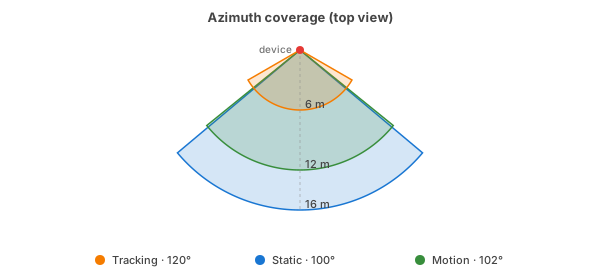
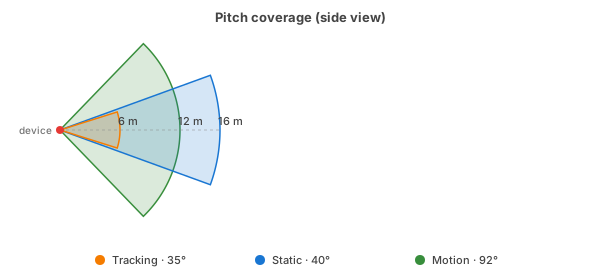
The Occupancy binary sensor in Home Assistant — the one you'll typically automate against — combines all three presence signals into a single entity. Each sensor on its own has gaps; together they cover each other. On the Everything Presence Lite, which has only the LD2450, occupancy comes from target tracking alone — see Models.
For example: someone walks into the bedroom and climbs into bed. The motion sensor catches the entry in a fraction of a second, so the main lights come on instantly. The LD2450 then tracks them across the room. When they reach the bed, an automation turns the main lights off and dims the bedside reading lights. Once they settle in and stop moving, the LD2450 loses them, but the SEN0609 keeps the room marked occupied, so Home Assistant still knows someone's there, so the main lights don't come on again when their partner enters the room.
Environmental sensors
Three environmental sensors ride along with the presence sensors and report room conditions independently.
- BH1750 — illuminance, in lux.
- SHTC3 — temperature and humidity.
- SCD4x / SCD40 — CO₂. Optional add-on — fit it yourself following Everything Smart's installation guide.
All four entities are disabled in Home Assistant by default. Enable the ones you want from the device page (Settings → Entities), or from Home Assistant's entity registry.
Warning
Temperature & Humidity Accuracy The device packs significant processing power into a compact enclosure. This generates heat that affects the temperature and humidity readings, which means that these readings do not reflect actual room conditions. These sensors are included for users who may find them useful despite limitations, but should not be relied upon for accurate climate control. For this reason they are disabled by default.
On the Everything Presence Lite: illuminance (BH1750) and the optional CO₂ module are present, but there's no temperature/humidity sensor. See Models.
LED and relay
The front LED can reflect device state (occupancy, CO₂ level) or be driven directly from your own automations. The solid-state relay output can feed presence into an alarm system, or drive low-voltage equipment directly.
See Everything Smart's hardware overview for relay wiring and ratings.
On the Everything Presence Lite: a plain on/off status LED replaces the addressable RGB LED, and there's no relay output. See Models.
Connectivity
Two firmware variants differ only in which network interface is active:
wifi-ble-co2— Wi-Fi. Needs SSID and password at flash time.ethernet-ble-co2— Ethernet. Plug in, power up, and the device shows up on the LAN. Supports Power over Ethernet (PoE), so a single cable handles data and power.
The Everything Presence Lite is Wi-Fi only — there's no Ethernet build. It
ships a single wifi-lite-co2 variant. It's CO2-capable and works whether or
not the SCD40 add-on is fitted — a missing module is handled gracefully. See
Models.
The Pro variants also run Bluetooth LE. Home Assistant exposes each Pro as a Bluetooth proxy for nearby BLE devices like temperature tags, buttons, or presence badges. If you've got BLE hardware around the house, each device becomes another reception point. The Lite has no usable Bluetooth, so its build leaves BLE out entirely.
On the Pro, a BLE Scan switch under the device's Configuration entities lets you turn the scan off when you don't need the proxy — useful if you have heavy proxied-BLE load and need to claw back heap headroom (each proxied device adds ~5-10 KB resident, plus transient processing spikes). See Troubleshooting → Free up memory by disabling BLE for the trade-off in numbers.
Where to next
- Installation → — install the integration and start flashing.