Automations
The three phases of presence
A typical "someone walks in, uses the room, leaves" sequence has three phases, and each phase wants a different kind of signal:
- Fast trigger. Somebody just walked in. Low latency matters; you want the lights on before the person has crossed the threshold.
- Zone-specific. The person is now in a particular region. Targeted actions fire: a mirror light, an extractor fan, a desk lamp.
- Empty gate. The room has been empty long enough that you can safely turn things off. Latency isn't as important as mistakenly declaring a room empty too soon.
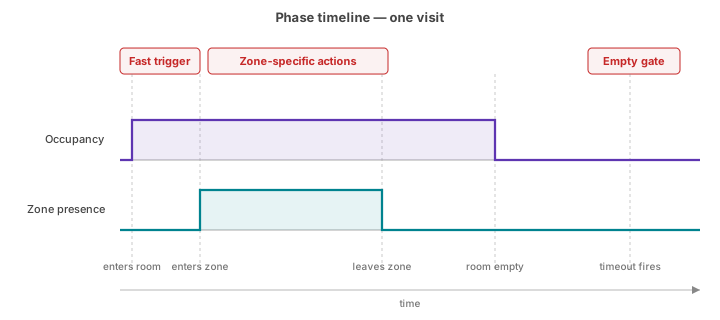
Occupancy and zone presence
For almost every automation, two entities cover the three phases between them.
Occupancy (binary_sensor.<device>_occupancy) is a single combined "someone
is in the room" signal. The firmware combines the PIR motion sensor, the SEN0609
static-presence radar, and any active zones together on the device, so you get
fast detection that stays on as long as someone is in the room. See
How detection works → The Occupancy entity.
Zone presence (binary_sensor.<device>_zone_<N>_presence) gives you one
entity per zone you've painted on the grid. Each zone has its own state machine,
with timing tuned to its
zone type (Bed, Seating,
Transit, and so on), so a zone holds its presence appropriately for the kind of
occupation it represents.
Warning
The target tracker that drives zone presence loses its targets when they are
still for an extended period. The integration works around that with the
Presence timeout and Handoff timeout, but you may still occasionally see
a zone report Clear (off) while it's still occupied.
Use a zone presence going Detected (on) to take positive action (turning
lights on), and the Occupancy entity going Clear (off) to take negative action
(turning lights off).
For zone-specific actions where the number of people matters, use
sensor.<device>_zone_<N>_target_count. Enable it under Settings >
Entities > Zone level > Target count, but be aware that you could
have two people in the same zone, both sitting very still, making the target
count read zero.
Note
Zone entities are translated by their friendly name (Zone <name> in the HA
UI), but entity IDs stay as zone_<N>_presence where <N> is 0–7. Use
entity IDs in automations so they keep working if you rename a zone.
Worked example: passage light
A first pair of automations, one to turn the passage light on when somebody enters:
description: "Turn passage light on when somebody enters"
triggers:
  - trigger: state
    entity_id: binary_sensor.passage_presence_occupancy
    to: "on"
actions:
  - action: light.turn_on
    target:
      entity_id: light.passage
and one to turn it off when they exit:
description: "Turn passage light off when the last person exits"
triggers:
  - trigger: state
    entity_id: binary_sensor.passage_presence_occupancy
    to: "off"
actions:
  - action: light.turn_off
    target:
      entity_id: light.passage
It's usually cleaner to fold both of these into a single automation that uses trigger IDs to choose which action to take:
mode: restart
triggers:
  - trigger: state
    entity_id: binary_sensor.passage_presence_occupancy
    to: "off"
    id: occupancy_off
  - trigger: state
    entity_id: binary_sensor.passage_presence_occupancy
    to: "on"
    id: occupancy_on
actions:
  - choose:
      - conditions:
          - condition: trigger
            id: occupancy_on
        sequence:
          - action: light.turn_on
            target:
              entity_id: light.passage
      - conditions:
          - condition: trigger
            id: occupancy_off
        sequence:
          - action: light.turn_off
            target:
              entity_id: light.passage
Worked example: bathroom
A more sophisticated automation for a bathroom with a Toilet zone (zone 1) and a Shower zone (zone 2).
The aims:
- When anybody enters the bathroom, turn on the main light.
- When somebody sits on the toilet for more than a minute, turn on the extractor fan.
- When somebody enters the shower for more than a minute, turn on the shower light, the extractor fan, and the heated towel rack.
- Lights turn off 2 minutes after the bathroom is vacated.
- Extractor fan turns off 15 minutes after the bathroom is vacated.
- Towel rack turns off 2 hours after the bathroom is vacated.
Mapping to the three phases:
- Fast trigger → main light on.
- Zone-specific → extractor fan, shower lights, and towel rack.
- Empty gate → lights, extractor fan, and towel rack off.
mode: queued
max: 10
triggers:
  - trigger: state
    alias: "When somebody enters the bathroom"
    entity_id: binary_sensor.bathroom_presence_occupancy
    to: "on"
    id: occupancy_on

  - trigger: state
    alias: "When somebody sits on the toilet for 1 minute"
    entity_id: binary_sensor.bathroom_presence_zone_1_presence # toilet
    to: "on"
    for: { hours: 0, minutes: 1, seconds: 0 }
    id: toilet_on

  - trigger: state
    alias: "When somebody enters the shower for 1 minute"
    entity_id: binary_sensor.bathroom_presence_zone_2_presence # shower
    to: "on"
    for: { hours: 0, minutes: 1, seconds: 0 }
    id: shower_on

  - trigger: state
    alias: "Two minutes after the bathroom is vacated"
    entity_id: binary_sensor.bathroom_presence_occupancy
    to: "off"
    for: { hours: 0, minutes: 2, seconds: 0 }
    id: occupancy_off_2

  - trigger: state
    alias: "Fifteen minutes after the bathroom is vacated"
    entity_id: binary_sensor.bathroom_presence_occupancy
    to: "off"
    for: { hours: 0, minutes: 15, seconds: 0 }
    id: occupancy_off_15

  - trigger: state
    alias: "Two hours after the bathroom is vacated"
    entity_id: binary_sensor.bathroom_presence_occupancy
    to: "off"
    for: { hours: 2, minutes: 0, seconds: 0 }
    id: occupancy_off_120

actions:
  - choose:
      # When somebody enters the bathroom, turn on the main light
      - conditions:
          - condition: trigger
            id: occupancy_on
        sequence:
          - action: light.turn_on
            target:
              entity_id: light.bathroom_main_light

      # When somebody sits on the toilet for 1 minute, turn on the extractor fan
      - conditions:
          - condition: trigger
            id: toilet_on
        sequence:
          - action: fan.turn_on
            target:
              entity_id: fan.bathroom

      # When somebody enters the shower for 1 minute, turn on the extractor fan,
      # the towel rack, and the shower lights
      - conditions:
          - condition: trigger
            id: shower_on
        sequence:
          - action: light.turn_on
            target:
              entity_id: light.bathroom_shower_light
          - action: fan.turn_on
            target:
              entity_id: fan.bathroom
          - action: switch.turn_on
            target:
              entity_id: switch.bathroom_towel_rack

      # Two minutes after the bathroom is vacated, turn off all lights
      - conditions:
          - condition: trigger
            id: occupancy_off_2
        sequence:
          - action: light.turn_off
            target:
              entity_id:
                - light.bathroom_main_light
                - light.bathroom_shower_light

      # Fifteen minutes after the bathroom is vacated,
      # turn off the extractor fan
      - conditions:
          - condition: trigger
            id: occupancy_off_15
        sequence:
          - action: fan.turn_off
            target:
              entity_id: fan.bathroom

      # Two hours after the bathroom is vacated, turn off the towel rack
      - conditions:
          - condition: trigger
            id: occupancy_off_120
        sequence:
          - action: switch.turn_off
            target:
              entity_id: switch.bathroom_towel_rack
Clearing the heatmap
The eppgrid.clear_heatmap action wipes the accumulated heatmap
for one or more sensors — permanently, with no undo. It's an admin-only action,
meant for Developer tools or an automation you trigger yourself (a schedule, a
script) rather than for household members — for that, use the dashboard card's
Toggle and clear on card button instead.
Target it at a device, entity, area, or label the same way as any other HA action; leave the target empty to clear every Everything Presence Grid sensor at once.
Troubleshooting
| Symptom | Likely cause | Fix |
|---|---|---|
Automation referencing zone_<N>_presence never fires |
Device-level Zone Presence toggle is off; the entity is disabled in Home Assistant's entity registry | Enable Zone Presence on the device page. See Detection zones. |
| Sofa / reading-chair zone flaps on and off | Zone type is "Default", which falls off too fast for seating | Change the zone's type to Seating in the Detection zones editor. |
| Bedroom zone flaps on and off when sleeping | Zone type is "Default", presence timeout too short for sleeping | Change the zone's type to Bed in the Detection zones editor. |
Still stuck? See Troubleshooting for how to open an issue.
Where to next
- Firmware upgrades → — keep firmware up to date over the air.
- Settings → — tune detection ranges, reporting intervals, LED/relay behaviour, and more.