Troubleshooting
Each feature page in this user guide ends with a Troubleshooting table covering symptoms specific to that area. If you've worked through the relevant one and the problem isn't there, open a GitHub issue.
A flashed device still shows "Flash firmware over USB"
On Home Assistant 2026.8 and newer, a device already running Everything Presence Grid firmware could be listed under Flash Firmware as still needing to be flashed over USB — and could be missing from the panel's device list, with its zones and settings unavailable. This was caused by a change in how Home Assistant 2026.8 labels ESPHome entities internally.
Fix: update the integration to 1.7.0 or newer (HACS → Everything Presence Grid → Update), then reload it or restart Home Assistant. The device is recognised again with no re-flash needed.
No target dots, and Target Presence stays clear
Presence and motion still work, but nobody shows up on the panel and Target Presence never turns on. Presence and motion come from separate sensors (a PIR and the mmWave presence sensor), so they keep working even when the tracking sensor (the LD2450, which draws the moving dots) has gone quiet.
Check the Tracking Sensor entity on the device:
- Connected — the tracker is sending data. If there are still no dots, the people are likely beyond its range (~6 m); walk closer to the sensor, and check your target distance in Settings → Detection Ranges.
- Disconnected — the tracker isn't sending anything. Fully power-cycle the device (unplug for ~10 seconds), or press the Reboot Tracking Sensor button. If it stays Disconnected after that, the tracking sensor itself has most likely failed.
Device keeps going unavailable
Each device exposes several diagnostic entities under Settings → Devices & services → ESPHome → [your device] → Diagnostic (filter by Diagnostic in the entity card menu). They make it easy to tell whether an "unavailable" episode in HA history was a real reboot (memory exhaustion, brownout, watchdog) or just a network blip:
- Heap Free — current free RAM in bytes.
- Heap Largest Block — biggest contiguous chunk available; lower than
Heap Freeindicates fragmentation. - Heap Min Free — lowest the heap has ever been since boot. Only resets on reboot.
- Loop Time — max main-loop time in the last minute. Spikes correlate with memory pressure or BLE work.
- Uptime — seconds since boot. Drops to ~0 on every reboot.
- Reset Reason — why the last reboot happened:
POWERON(cold start),EXT(manual restart),SW_CPU/TASK_WDT/INT_WDT/LOAD_PROHIBITED(firmware crash, often memory-related),BROWNOUT(power dip). - WiFi Signal — current signal strength (RSSI) in dBm, on WiFi builds. See WiFi keeps dropping below.
How to diagnose: open HA history for Heap Min Free and Uptime. If
Uptime dropped to 0 around the unavailable window, the device rebooted — check
Reset Reason for the cause. If Uptime kept climbing through the unavailable
window, the device stayed up and you have a network problem (WiFi, router, HA
connectivity), not a firmware problem — see
WiFi keeps dropping.
A Heap Min Free reading below ~5 KB means the device has come close to running
out of memory at some point this uptime cycle. If reboots correlate, you likely
have an OOM problem — BLE scanning is the dominant heap consumer on this
firmware, so the first thing to try is
Free up memory by disabling BLE below.
Free up memory by disabling BLE
If Heap Min Free keeps dipping into single-digit KB and reboots correlate, you
can disable BLE scanning to give yourself more headroom. Measured costs of
BLE-on with no proxied devices connected:
| Metric | BLE off | BLE on | Cost of BLE-on |
|---|---|---|---|
| Heap Free (steady-state) | ~76 KB | ~71 KB | -4 KB |
| Heap Largest Block | ~53 KB | ~43 KB | -10 KB |
| Heap Min Free (worst-case dip) | ~54 KB | ~35 KB | -20 KB |
Add ~5-10 KB resident heap per BLE device proxied through the EPP (each open
GATT connection holds its own client state, characteristic cache, and
notification handlers). On the wifi-ble-co2 variant the proxy is configured for
up to 3 simultaneous connections — proxying 3 active devices can therefore eat
another 15-30 KB on top of the table above, plus more transient heap during
their notification traffic. If you have a busy proxy and see Heap Min Free
near zero, the trade-off shifts: you may need to either cut proxied devices or
disable the scan entirely.
The always-resident cost of just-scanning-no-proxied-devices is small (~4 KB), but BLE causes ~20 KB transient spikes during scan-result processing — that's where the real headroom goes when something else (network, sensor activity) needs heap at the same moment.
Toggle the BLE Scan switch off under Settings → Devices & services → ESPHome → [your device] → Configuration. The device reboots once to drop any active proxy GATT connections, then comes back up with scanning disabled — and the OFF state persists across future reboots. Re-enable any time by toggling the switch back on.
The BLE controller stack itself stays loaded either way (~10-15 KB), so this isn't a full BLE-off — it stops the active scan and (after the reboot) drops any in-flight proxy connections. Most users don't need this knob; it's mostly a safety valve if you have heavy proxied-BLE load or are seeing OOM-driven reboots.
WiFi keeps dropping
If Uptime keeps climbing but the device still goes unavailable, it's losing
its network connection rather than rebooting. On WiFi builds the WiFi Signal
diagnostic entity (RSSI, in dBm, updated once a minute) shows how strong the
connection is at the device's mounted location — which is exactly what you
can't measure by plugging it into a laptop, because that moves it somewhere with
different reception.
Read it from Settings → Devices & services → ESPHome → [your device] → Diagnostic. RSSI is negative; closer to zero is stronger:
| WiFi Signal | Meaning |
|---|---|
| Above -60 dBm | Excellent |
| -60 to -70 dBm | Good |
| -70 to -80 dBm | Marginal — expect occasional drops |
| Below -80 dBm | Poor — frequent drops likely |
If the signal is marginal or poor, the fix is on the network side:
- Move the device closer to your router, or add or relocate a mesh node or access point nearer its mounting spot.
- On a mesh network, a device parked midway between two nodes can bounce between them — bringing it clearly within range of one node usually settles it.
- Give the device a fixed DHCP reservation so its IP never changes.
When the signal looks fine but it still drops
A strong RSSI doesn't rule out a WiFi problem — plenty of drops happen at -50 dBm because the router ended the connection, not because the signal was weak. Five more diagnostic entities record what happened at the moment of each drop and report it once the device is back online, so you don't have to catch it live or tether the device to a laptop:
| Entity | What it tells you |
|---|---|
| WiFi Disconnects | How many times the device has lost WiFi since it last booted |
| WiFi Disconnect Reason | Why the link went away, the last time it did |
| WiFi Disconnect Signal | RSSI at the exact moment of the drop |
| WiFi Downtime | How many seconds the last outage lasted |
| WiFi BSSID | Which access point the device is connected to |
How to read them:
- WiFi Disconnects stays at 0 while HA still shows the device unavailable. The device never lost WiFi. The problem is elsewhere on the network — or in Home Assistant's connection to it — and moving the device or changing your WiFi will not help. Worth reporting as an issue.
- The reason is
Beacon Timeout. Nobody disconnected the device; it stopped hearing the router. That's coverage or interference, even if the average signal looks acceptable — check WiFi Disconnect Signal to see what RSSI actually was at the drop, which is often much worse than the once-a-minute average. - The reason mentions Association Leave, Auth Expire, or BSS Transition. Your router ended the connection. On a mesh this is usually the router steering the device to a different node — check whether WiFi BSSID changes each time, and see the mesh note above.
- The reason mentions No AP Found. Your router is refusing the device on its own terms rather than simply dropping it — the RSSI-threshold and auth-threshold variants in particular are typical of a mesh that has decided the device belongs on a different node.
- The reason mentions Inactivity. The router dropped the device because it saw no traffic from it. Some routers are aggressive about this with low-power devices.
- The reason is
Auth Failor a handshake timeout. The device was rejected. Check the WiFi password and whether your router changed its security mode. - WiFi Downtime is short (a few seconds) but HA showed the device unavailable for much longer. WiFi recovered quickly and something above it was slow to reconnect — worth reporting as an issue.
These entities only update when the connection actually drops, so on a healthy device they stay unchanged: WiFi Disconnects reads 0, and WiFi Downtime, WiFi Disconnect Reason and WiFi Disconnect Signal stay empty until the first drop.
One limit: if the device is off WiFi for more than about 15 minutes it reboots itself to try to recover, which resets these counters. They're built for the repeated short drops in this section, not for a router that has been off all night — for that, Uptime tells the story.
The WiFi entities only exist on WiFi builds; the ethernet variant has no WiFi radio.
Reporting an issue
If you've worked through the relevant feature-page Troubleshooting table and the sections above and the problem isn't covered, open a GitHub issue. To get a useful diagnosis fast, gather the diagnostics and debug logs before filing.
1. Collect diagnostics
- In Home Assistant, go to Settings → Devices & services.
- Find Everything Presence Grid in the integration list.
- Click the three-dot menu on the integration card → Download diagnostics.
- Save the JSON file — you'll attach it to the issue below.
2. Capture debug logs
If the bug is something the integration logs about (errors in HA system logs, the panel showing a connection error, an automation behaving wrong), capture debug logs before reproducing the issue. Firmware logs stream out via the integration into Home Assistant's standard log system, but to actually see them you need both the firmware and the integration to be logging.
Raise the firmware log level for the relevant components. Under Settings → Logging in the panel, set the components you care about to Debug. For zone-related issues that's typically Zone Engine; for connectivity issues, Network or System.
Enable debug logging on the integration in Home Assistant. Go to Settings → Devices & services → Everything Presence Grid → ⋮ → Enable debug logging.
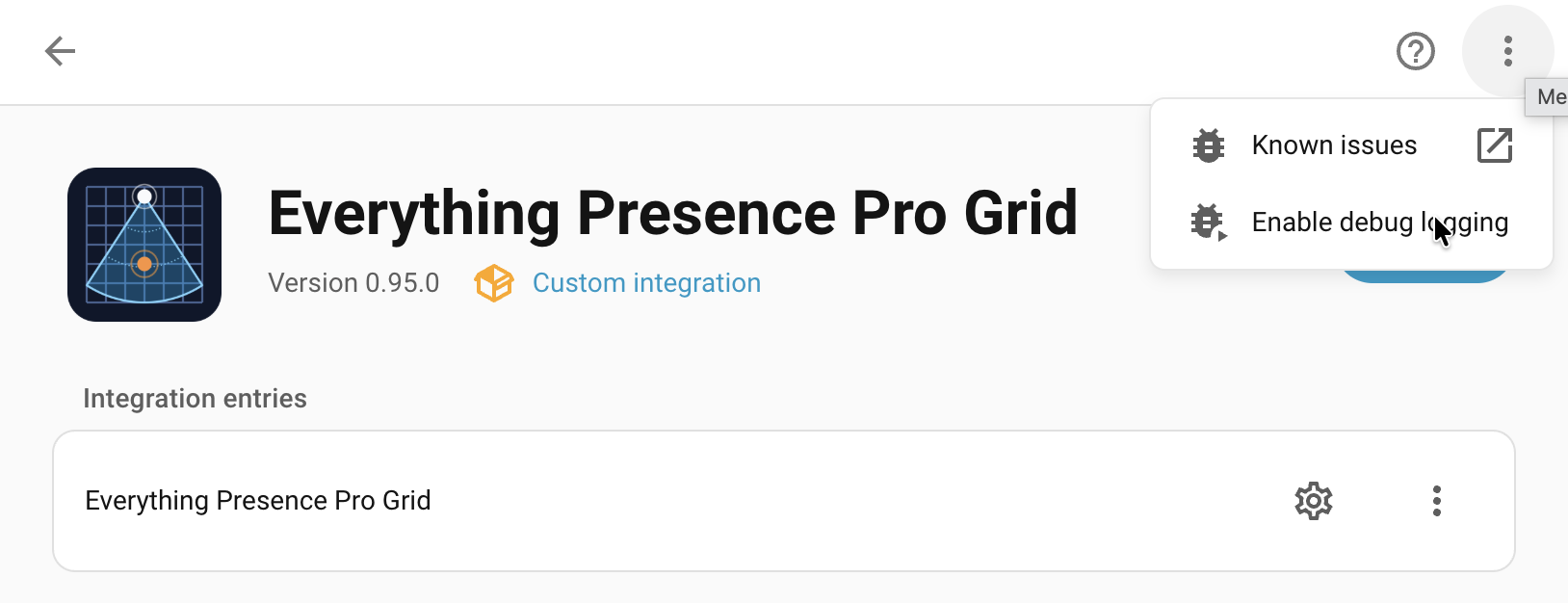
Alternatively, call the logger.set_level action from Settings → Developer
tools → Actions:
Reproduce the bug. You can watch logs live at Settings → System → Logs in Home Assistant if you want to see messages as they appear. Firmware messages appear inline with the integration's own output.
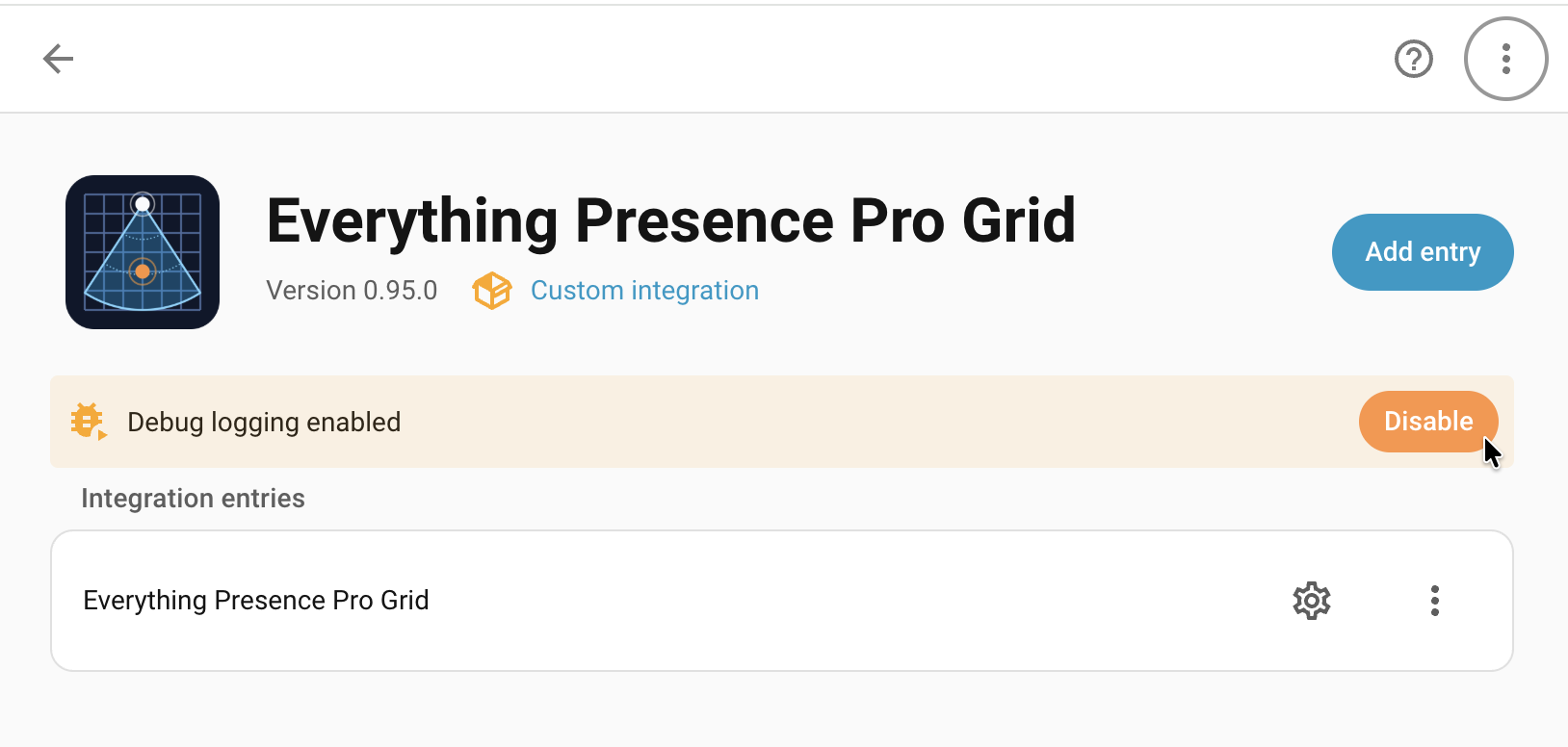
Download the captured logs. If you used the Enable debug logging option on the integration page, then click Disable debug logging on the same page. Home Assistant writes the captured logs to a file and downloads it; attach it to the issue alongside the diagnostics JSON.
3. File the issue
Open the issue at github.com/clintongormley/everything-presence-pro-grid/issues.
Include the following in the issue description:
- Home Assistant version (e.g. 2026.4.2).
- Everything Presence Grid integration version (from HACS, or the
manifest.json). - Device firmware version (from the device's Firmware Version sensor).
- Steps to reproduce — numbered, starting from a known state.
- Expected vs actual behaviour.
- Diagnostics JSON — attach the file you saved above.
- Debug log file — if you turned on debug logging, attach the downloaded log too.