Firmware upgrades
Once a device is running Everything Presence Grid firmware and on your network, updates happen over the air. No USB cable needed.
The Everything Presence Grid integration is pinned to a specific firmware version. When you upgrade the integration via HACS to a release that expects a newer firmware than what your devices are running, the integration notifies you and offers to upgrade.
Two ways to upgrade
When the integration detects a device is on older firmware than expected, it raises a notification under HA's Settings → Repairs with the device name. You can update from either of two places:
From Settings → Repairs (one-click)
- Open Settings → Repairs.
- Click the {device_name} firmware update required entry.
- Click Submit to start the upgrade. The dialog shows a spinner while the device downloads, flashes, reboots, and reconnects.
- On success the dialog closes; on failure it shows the error message — click Submit again to retry.
This is the path most users will take when upgrading the integration.
Note
The Repairs dialog waits up to three minutes for the device to come back on the new version before reporting a timeout. The flash itself can occasionally take longer than that on a slow link or a busy device. If the dialog times out but the device looks healthy, check the Flash Firmware tab in the EPP Grid panel for live status — the OTA may still complete in the background and the Repairs entry will clear itself when the device reports the new version.
From the EPP Grid panel's Flash Firmware tab
- The Flash Firmware tab lists your devices and their firmware versions.
- Devices on older firmware show an Update button with an "Update needed" badge.
- Click Update. Progress streams live to the panel with richer per-device detail and immediate error messages from the device log.
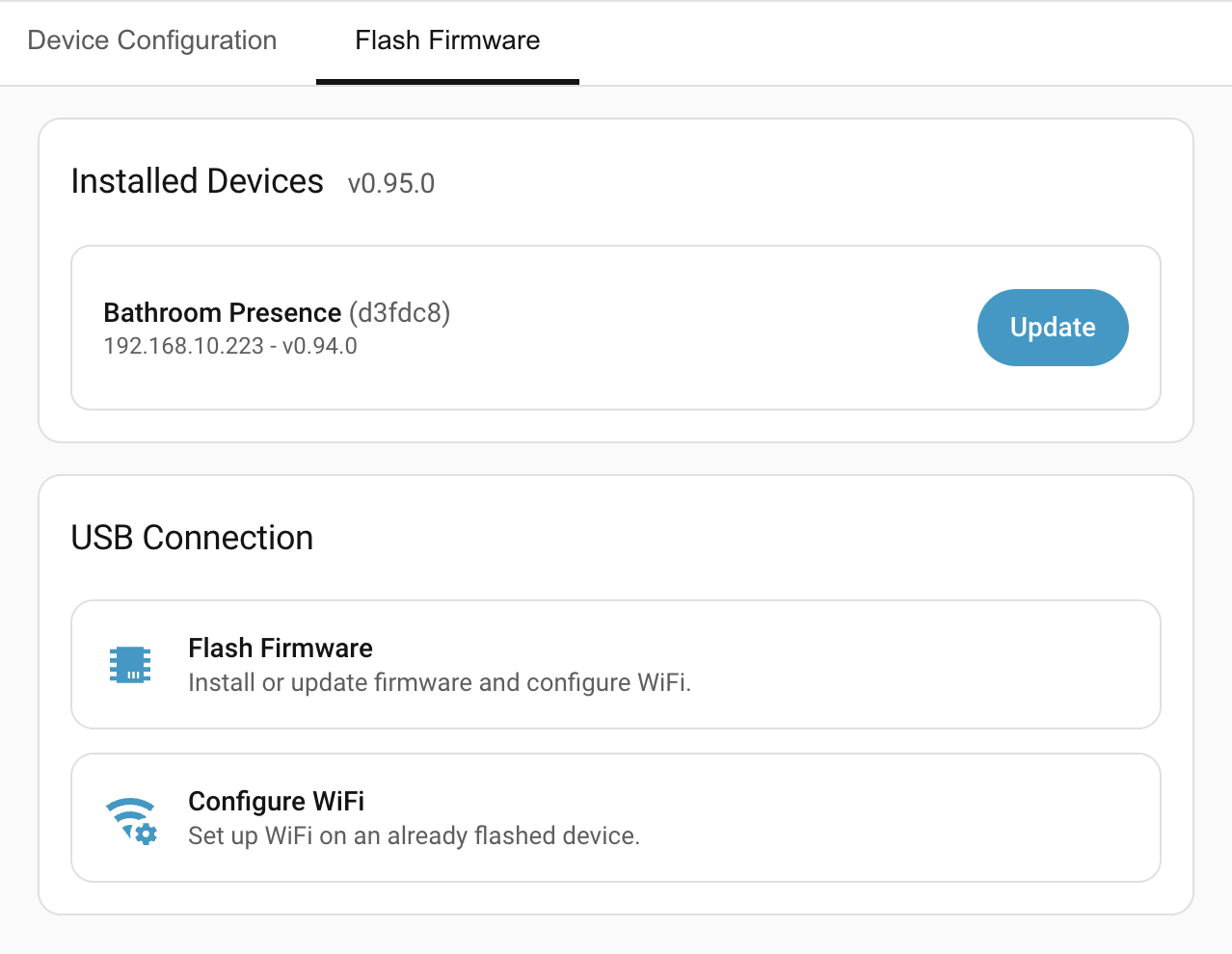
Both paths trigger the same OTA on the device. Use the panel when you want richer real-time progress; use Repairs when you just want to click Submit and move on.
Note
The firmware also publishes an ESPHome Firmware Update entity, but its automatic version-check polling is disabled — the integration drives version detection itself, so the entity won't show pending updates on HA's standard Updates dashboard. Use Repairs or the panel.
Devices without internet access
The Repairs and panel update paths serve the firmware from Home Assistant over your LAN, so the device only needs to reach the HA host (not the internet). The native ESPHome Firmware Update entity is the exception — it downloads directly from the internet, so use Repairs or the panel on restricted networks.
If Home Assistant can't serve the firmware itself — it can't download and stage that version, or can't work out a LAN address to offer the device — those paths fall back to fetching it straight from GitHub automatically, so an internet-connected device still updates with no extra step. (The Download from GitHub button below is the manual version of that, for when Home Assistant does serve an address but the device can't reach it — see the Docker note.)
Home Assistant in Docker
For a device to download from Home Assistant, it has to reach the Home Assistant
host over your LAN. If Home Assistant runs in a Docker container on a bridge
network, it can hand the device its internal container address (e.g.
172.x.x.x), which devices on your LAN can't reach — the update then fails with
"couldn't reach the download server". Run the Home Assistant container with
host networking (network_mode: host, and drop the ports: mapping) so it
uses the host's LAN address, which devices can reach.
If a device can't download from Home Assistant but does have its own internet access, the panel shows a Download from GitHub button next to Retry on that error. It re-runs the update fetching the firmware straight from GitHub instead of from Home Assistant, bypassing the LAN-serving path entirely.
When OTA fails
The panel reports a specific error and offers Retry. Common causes:
- Connection lost during update. The device fell off the network mid-flash. Power-cycle and retry. If it keeps happening, check the Wi-Fi signal at the device or switch to the Ethernet variant.
- Update interrupted. The device came back on its previous firmware — it likely lost power or disconnected mid-update, so the flash didn't take. Keep it powered and connected to your network, then try the update again.
- Update timed out. The device didn't finish within the expected window. Usually a one-off; retry.
- Update failed. The device refused the update or the flash partition is unhealthy. Retry via OTA; if that fails, re-flash via USB (see Flashing firmware).
Integration vs firmware versions
If your firmware version is newer than your installed Everything Presence Grid integration, the panel refuses to operate the device until the integration is updated. Look for the Integration update required banner and update the integration via HACS.
Flashing a specific version
To roll back or pin to a specific firmware version, flash via USB. See Flashing firmware.
Troubleshooting
| Symptom | Likely cause | Fix |
|---|---|---|
| OTA stalls or times out repeatedly | Weak Wi-Fi at the device | Move the device, switch to Ethernet variant, or flash via USB. |
| OTA reports "Update failed" on every retry | Flash partition unhealthy | Re-flash via USB. |
| Panel refuses to control device | Firmware newer than installed integration | Update the integration in HACS. |
| Device disappeared from the list after a variant swap | ESPHome cache stale | Remove and re-add the device in Settings → Devices & services → ESPHome. |
| OTA fails with a connection error on a device that has no internet access | Device blocked from the internet and cannot reach the Home Assistant host | Ensure the device can reach Home Assistant on your network; update via Repairs or the panel, not the native Firmware Update entity. |
Still stuck? See Troubleshooting for how to open an issue.
Where to next
- Troubleshooting → — collect diagnostics and open an issue if something's not working right.