Detection ranges
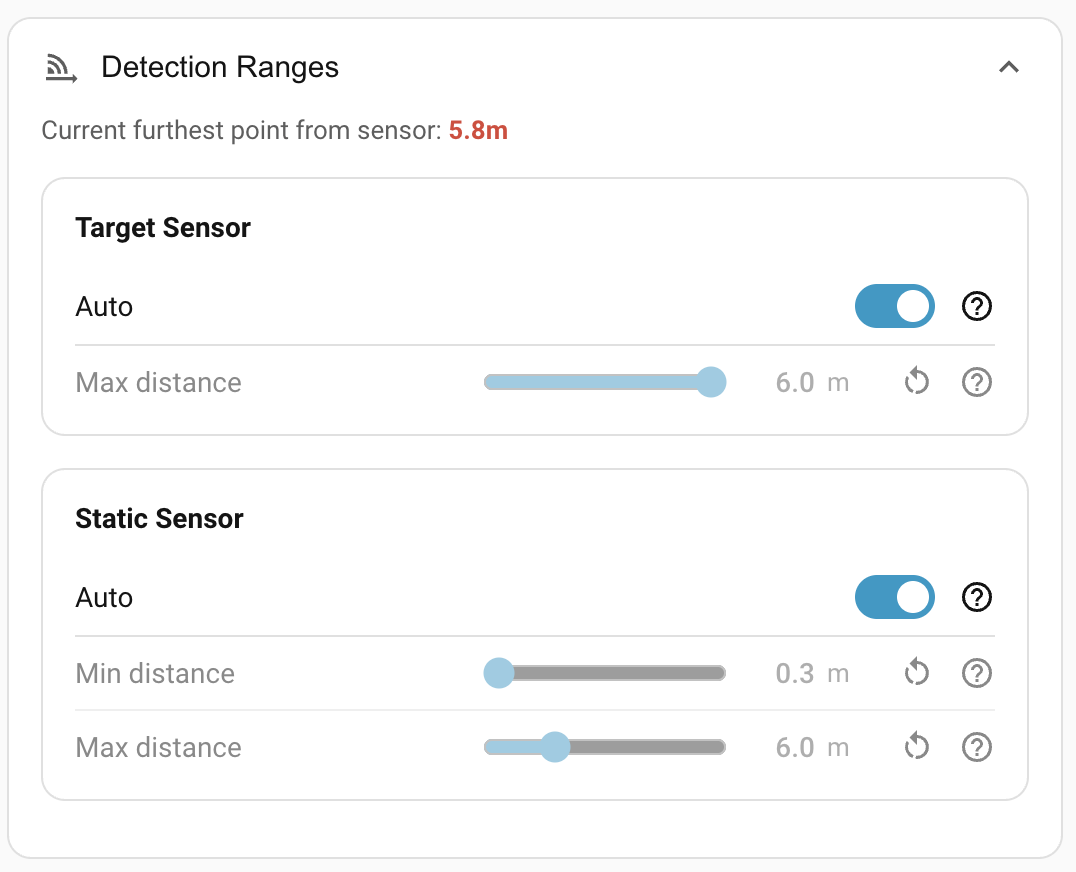
How far each mmWave radar is allowed to see. Lives under Settings → Detection Ranges in the panel.
Why change a sensor's range?
The SEN0609 reaches up to 16 m, which is more than most rooms need. The LD2450 caps at 6 m, which is sometimes less than you'd like. The right range depends on the room and on what you want each sensor to cover.
The room calibration tells the panel where your walls are. The Auto toggle on each sensor uses that to compute the distance from the sensor to the furthest cell of your room grid, and automatically clips the range there. Here are two situations where the Auto behaviour matters:
Overlapping sensors
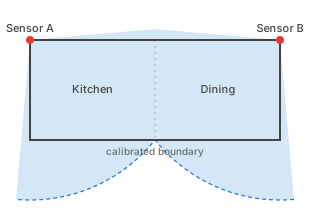
Imagine you have one room (a combined kitchen-and-dining room, for instance) which is too long to be covered by a single sensor. Instead, you install a sensor at each end of the room. With both at full range they bleed into each other's detection areas. The Auto setting clips each device to its own end of the room.
Tip
It is not possible to adjust the range of the motion sensor. In an example such as this one, the signal from each motion sensor would cover the entire room. Instead, it may make sense to use the mmWave presence entity instead of the Occupancy entity.
Tip
When multiple 24 GHz band radars are present, do not install them in the direction directly opposite to the beam, but as far away as possible to avoid possible mutual interference.
A too-large room
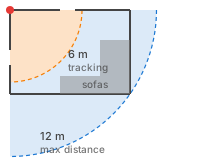
Imagine you have one device monitoring a large room, where you want the static sensor to cover beyond the LD2450's reach. You can't do target tracking in the whole room, but it may be sufficient to use just the static sensor to check that the room is still occupied. In this case, turn Auto off on the static sensor and set Max distance manually to cover the whole room.
Tip
A range set by Auto follows the room size as you recalibrate. A manually set range stays where you put it.
Target sensor (LD2450)
The LD2450 is the radar that drives target tracking and zone detection. See Hardware → LD2450.
| Control | Default | Notes |
|---|---|---|
| Auto | On | Use the calibrated room dimensions to set max distance. |
| Max distance | 6 m (auto) | Range 0.5–6 m when set manually. Greys out while Auto is on. |
The LD2450 has no minimum range setting; the chip itself reports targets from a few centimetres outward. There's also no separate sensitivity dial: the engine computes a per-target reliability score from frame visibility. See How detection works → Smoothing and signal strength.
Static sensor (SEN0609)
The SEN0609 mmWave radar reports a single "someone here / not here" signal. See Hardware → SEN0609.
| Control | Default | Notes |
|---|---|---|
| Auto | On | Use the calibrated room dimensions to set max distance. Min stays at 0.3 m. |
| Min distance | 0.3 m | Range 0.3–16 m. Greys out while Auto is on. |
| Max distance | 16 m (auto) | Range 2.4–16 m when set manually. Greys out while Auto is on. |
A non-zero Min distance is occasionally useful when something close to the device, like a houseplant or a draught, is fooling the static sensor. Push the minimum out past it.
The SEN0609's sensitivity and timing controls (presence delay, presence timeout, trigger / renew thresholds) live under Sensor calibration.
Resetting
Each row has a ↺ reset button that returns just that control to its default.
Where to next
- Sensor calibration — sensitivity and timing for the motion and static sensors.