Occupancy
Checks whether one or more presence sensors report a room as occupied (Detected) or vacant (Clear).
This is the purpose-built way to drive presence-based lighting. Under the hood a
presence sensor is just a binary_sensor, so you could express the same test
with an Entity state condition — but the Occupancy condition
gives you a sensor picker that only lists presence-type sensors, a
Detected/Clear toggle, and (importantly) the right precedence relative to
your other rules.
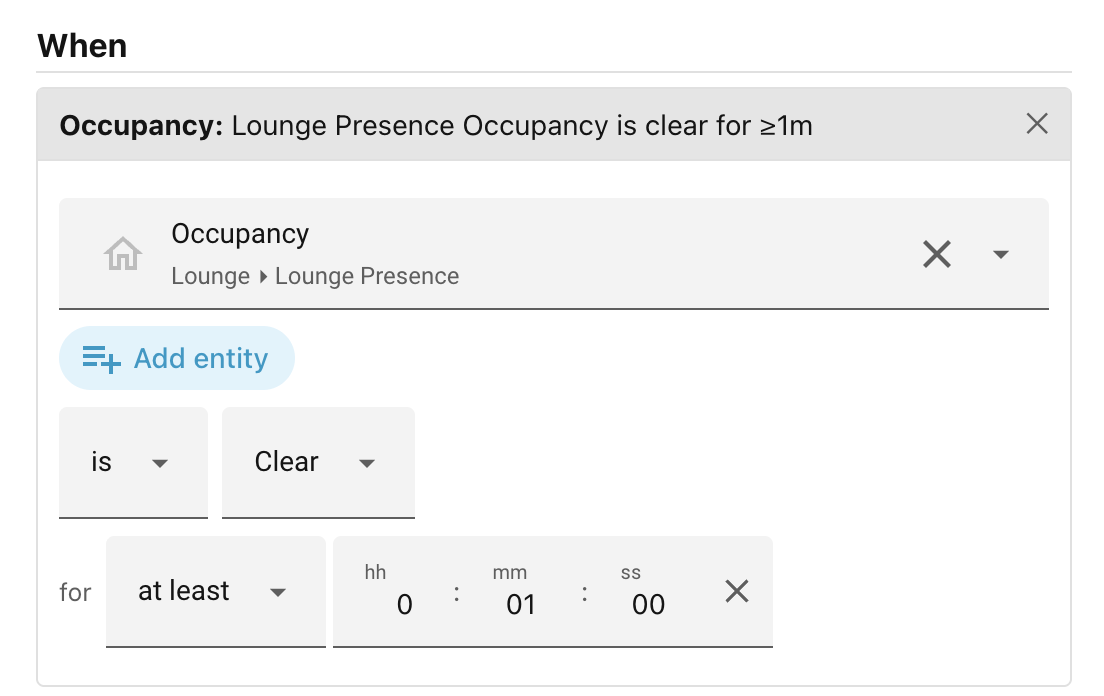
When you add an Occupancy condition to a scene, the editor shows:
- Any of / All of — shown above the sensors only when you pick more than one. "Any of" passes when at least one sensor is in the chosen state; "All of" requires every sensor to be.
- Sensors — a picker listing your
binary_sensorentities whose device class isoccupancy,presence, ormotion. Pick one or more. - is / is not and Detected / Clear — the state to test and whether to invert it: "is not clear for 2 minutes" is not the same as "is detected for 2 minutes"
- for — an optional duration (see the for duration). With "Any of", the clock tracks the combined test, so it keeps running through a handover from one sensor to another as long as some chosen sensor stays in the wanted state.
Examples
| Setup | Meaning |
|---|---|
| Lounge sensor, Detected | The lounge is occupied right now. |
| Lounge sensor, Clear, for 15m | The lounge has been empty for 15 continuous minutes. |
| Any of, Hall + Stairs, Detected | Someone is in the hall or on the stairs. |
| All of, Hall + Stairs, Clear | Both the hall and the stairs are empty. |
A sensor reporting unavailable or unknown never counts as occupied or vacant
— it is treated as unobservable, so the condition does not pass on it, and is
not never inverts an unobservable sensor into a match.
Next: People.