Template
The Template condition evaluates a Home Assistant Jinja2 template against current state and treats the result as a yes/no answer. It is a flexible escape hatch for situations that no other condition covers — if you can express the check as a template, this condition can act on it.
This is the most advanced condition type. It assumes familiarity with Home Assistant's templating language.
Open the condition editor and choose Template. A text area appears where you
write your Jinja template. The template can be as simple as a single expression
wrapped in {{ }} or a multi-line block using {% %} control structures, as
long as it produces a single value when rendered.
Ambience treats the condition as met when the rendered result is truthy by Home Assistant's own conventions:
| Result | Treated as |
|---|---|
true (boolean) |
met |
true, yes, on, 1, enable (strings, case-insensitive) |
met |
| Any non-zero number | met |
false, off, no, 0, none, blank, unknown |
not met |
Any other string (e.g. "42", "active") |
not met |
Note that a numeric string such as "42" is not truthy — only the
explicitly listed strings are. If your template produces a number rather than a
string, any non-zero value does count as met.
As you type, a live preview below the text area shows the current rendered value and whether Ambience would consider the condition met or not. The preview updates as referenced entities change, so you can watch it respond in real time before saving.
Leaving the text area empty sets the condition to a wildcard — it always matches, regardless of state.
Example
You want a scene to activate only when the living room is occupied and the outside temperature is below 10 °C — a combination that no single built-in condition covers.
{{ is_state('binary_sensor.lounge_presence_occupancy', 'on')
   and states('sensor.outside_temperature') | float(0) < 10 }}
This produces True or False. True is truthy, so the scene matches when
both tests pass. If either entity is unavailable the template returns False
and the condition does not match.
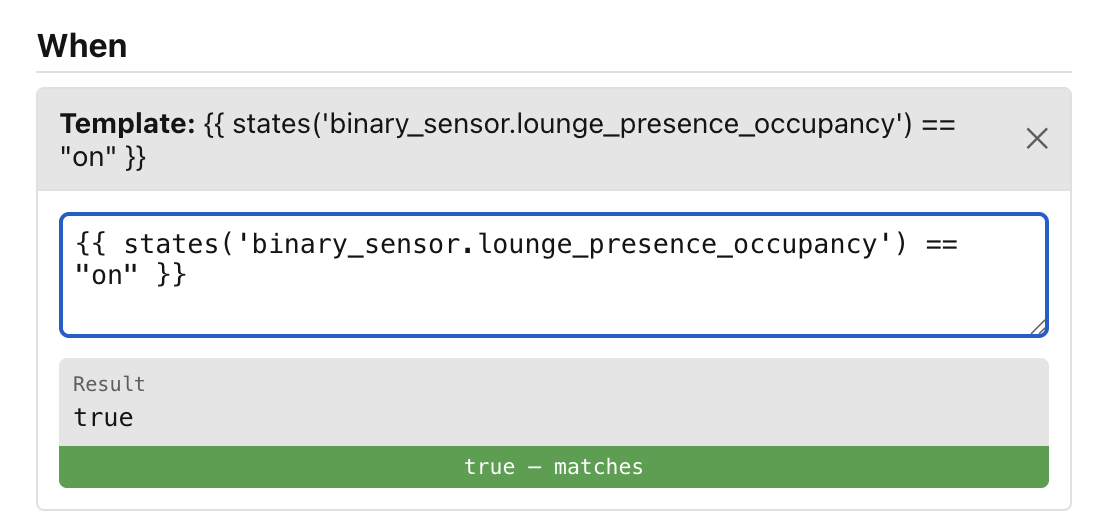
The Template condition extracts a list of entities from the template to use as Auto-triggers.
Notes
- A render error (for example, referencing an entity that does not exist) counts as not met. A warning is written to the Home Assistant log each time a template fails to render.
- Templates that iterate over all states (
stateswithout a domain filter) or scan an entire domain (states.sensor) are valid but trigger a warning in the Ambience logs, because Ambience cannot track dependencies entity-by-entity and will fall back to a broader re-evaluation strategy. - Templates that use
now()orutcnow()are re-evaluated periodically so that time-based checks stay accurate.
Next: Time of day.